Each merchant has a unique Credit Select Plus customer application link. Use your own link from the CSP module in Byzly or your welcome email.
Find the link in Byzly
- Open Financing Hub → Connections.
- Find the Credit Select Plus card.
- Open Application. View opens the customer landing page; Copy copies the application link; Send can send the application by email and/or text.
You can also copy your unique CSP URL and send it directly through your normal communication channel outside Flexxbuy/Byzly.
Start or share an application from CSP
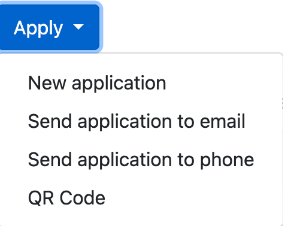
From the CSP Applications home screen, open Apply:
- New application: opens the customer application form.
- Send application to email: opens a Send Application dialog with an Email field. Enter the intended recipient and select Send.
- Send application to phone: opens a Send Application dialog with a Phone field. Enter the intended recipient and select Send.
- QR Code: displays the Application QR Code. Use the code belonging to your merchant account.
My Info also has shortcuts labeled New Application, Email Application and Text Application.
The applicant completes the application and reviews its consent and terms. CSP requires an SSN; do not collect it through this chat.
Choose the right type of link
A CSP application link starts a financing application. A Payment Hub link collects a payment. A Revolver Now invitation starts a separate consent and credit-card offer process.
Sharing a new application is also different from resending offers on an existing application. For existing offers, use the applicant file's Offers → Email Customer or Text Customer controls.
If you cannot find your link, access is missing, or a link is broken, contact info@flexxbuy.com.