Revolver Now uses a soft credit inquiry to present offers. The initial recommendation stage does not require an SSN. The card issuer's later application and approval process is separate, and a hard inquiry may occur. Approval and immediate temporary-card access are not guaranteed.
Send an invitation
- In Byzly, select Credit Cards to open the Revolver Now Dashboard. Merchants with access do not need a separate activation step.
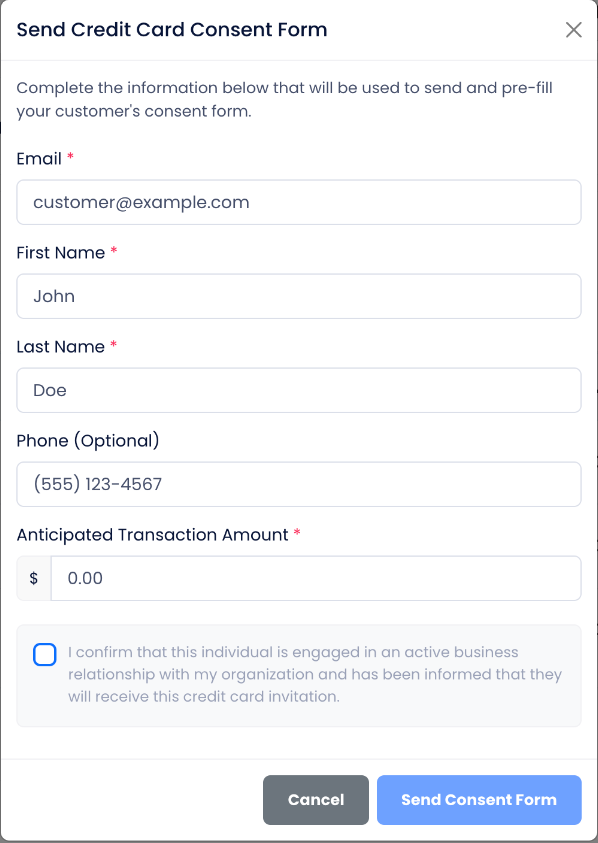
- Select Send Consent Form.
- Enter the customer's Email, First Name, Last Name and Anticipated Transaction Amount. Phone is optional on this merchant invitation form.
- Review the acknowledgment that the person has an active business relationship with your organization and has been informed that they will receive the invitation. Confirm it only when accurate.
- Select Send Consent Form. The customer receives an invitation to complete their own consent form.
The merchant's acknowledgment does not replace the customer's consent. The customer completes the requested information and consent in the customer form. The customer form can require information that was optional in the merchant invitation, including a phone number.
Resend or review
Use the dashboard's Invited tab to find the invitation. Select Resend Link for the correct customer when the invitation is needed again.
Revolver recommends the five best card options when qualifying options are available. The recommendation view can show three cards initially with Show 2 More Cards to expand the remaining two. An offer or dashboard status is not a guarantee of issuer approval, available credit or immediate access to a card number.
If the customer proceeds and the issuer approves the application, the customer can pay the merchant through the merchant's normal card processor.
For a Revolver technical problem or a consent link that is not arriving or working, contact info@flexxbuy.com. CSP instructions are not a substitute for the Revolver workflow.