
🧭 How to Submit a Merchant Referral
Submitting a referral is quick and easy. Follow the steps below to register your leads and ensure you get credit for every merchant you introduce to Flexxbuy.
Step 1: Go to the Partner Portal
Log in to your Flexxbuy Partner Portal.
From your dashboard, click “Submit Referral” in the top navigation bar.
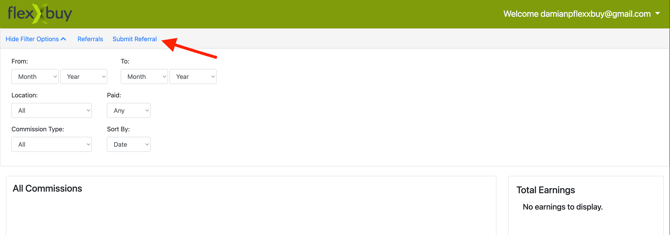
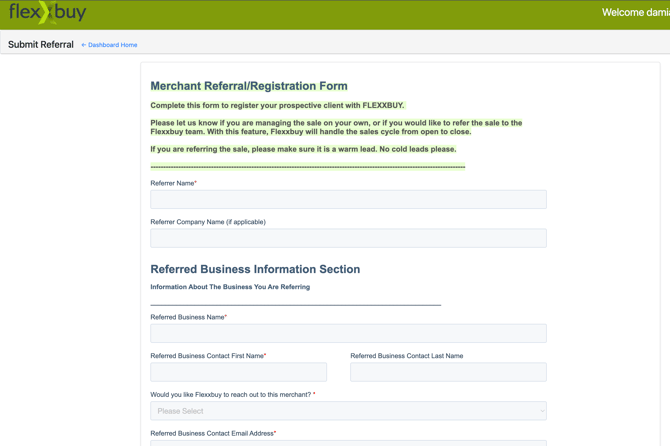
This will open the Merchant Referral/Registration Form.
Step 2: Complete the Referral Form
Fill in the required details for yourself and the business you’re referring. Be sure to include accurate contact information so we can properly track your lead.
Step 3: Choose How You’d Like the Lead Handled
When prompted with the question “Would you like Flexxbuy to reach out to this merchant?”, choose one of the following options:
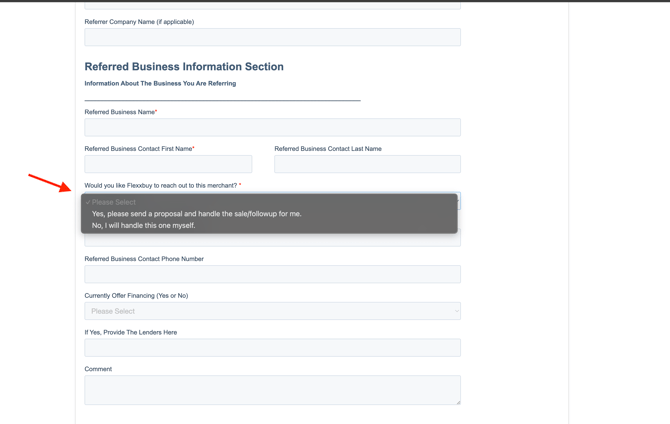
Option 1: “Yes, please send a proposal and handle the sale/follow-up for me.”
If you select this, the Flexxbuy sales team will take over and handle the process from start to finish.
We’ll:
-
Send the merchant an introductory email with your name included.
-
Share a detailed program breakdown, video demo, and enrollment link.
-
Follow up through our standard outreach cadence — including automated emails, occasional phone calls, and text reminders — without overwhelming the merchant.
You’ll receive full commission if the merchant enrolls, just as if you’d closed the sale yourself.
Option 2: “No, I will handle this one myself.”
If you prefer to manage the sale directly, simply choose “No.”
Flexxbuy will:
-
Record your lead in the system (to protect you from circumvention).
-
Not contact the merchant directly.
The commission structure remains the same — you’ll still earn:
-
$200 when the merchant signs up and pays the $399 setup fee.
-
40% of Flexxbuy’s 4.9% transaction fee on every funded sale for the lifetime of the account.
💡 Tip:
Always make sure you submit your leads before engaging with the merchant or asking Flexxbuy to do so. This ensures you’re properly credited for the referral and protected from duplicate submissions.
❓Common Questions
🕒 When are commissions paid?
Commissions are paid through Bill.com after each monthly cycle. Make sure your Bill.com account is set up and active. See How do commission payments work?
📋 Where can I track my referrals and earnings?
You can view all your referrals and earnings directly in the Partner Portal Dashboard. Use the filter options to sort by date, location, paid/unpaid, or commission type.
📞 What if I want Flexxbuy to follow up on my behalf later?
If you initially choose to handle the sale yourself, but later want Flexxbuy to step in — no problem. Just email our support team with the merchant’s name and we’ll activate our follow-up process.
🚫 What if my merchant doesn’t sign up right away?
No worries. If Flexxbuy is managing the follow-up, we’ll stay in touch through our automated outreach and occasional check-ins. If you’re managing the sale, you can follow up as often as you’d like — your referral is protected indefinitely.
👥 Can I refer as many merchants as I want?
Absolutely. There’s no limit to how many merchants you can refer — or how much you can earn.